

Your status tells colleagues whether you are available, and it can change how your calls are handled. Change it from the drop-down in the top bar.
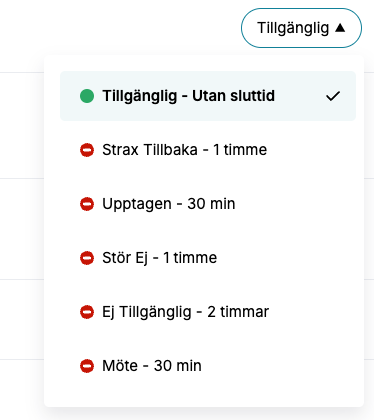
The drop-down has two parts: status shortcuts and presence statuses.
Status shortcuts
If your company has defined a shortcut, it sits at the top of the list. A shortcut sets a status with a predefined duration, and the duration is shown in the list. After you select it, ConnectMe shows the status and your availability under your avatar, not the name of the shortcut.
Presence statuses
The list shows the statuses your administrator has made available. Each status has its own call flow behind it, set up by your administrator. For example, a status can send your calls to a colleague or to voicemail.
When you pick a status, ConnectMe suggests when it should end and return you to the default status. It learns from your habits: it proposes the duration you used most often in your last five uses of that status. The default is one hour. For example, if you picked 15 minutes three times and 30 minutes twice, ConnectMe proposes 15 minutes.
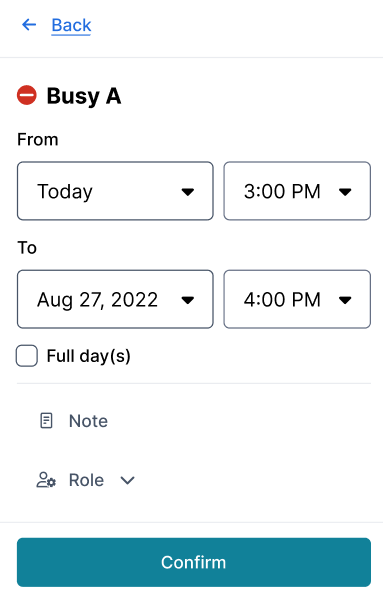
You can always choose another duration. To set the duration yourself, select the status in the top bar and click Set duration.
Custom status
Choose Custom to set the duration and also the note and role that are shown to colleagues.
Overlapping future statuses
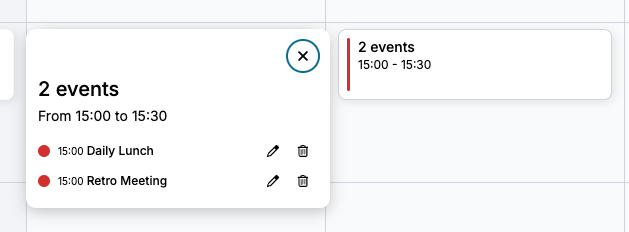
From version 8.19, you can view, edit and delete statuses planned for the future that overlap. Plan future statuses in the calendar. See the Calendar and Outlook Sync guide.
Call forwarding per status
You can set an unconditional call forward for each status. See the ConnectMe Settings guide.