

With VoIPcube, a call pop-up shows matching records from Freshdesk when someone calls you. Dstny connects VoIPcube to your Freshdesk for you.
What the pop-up shows
The pop-up appears on incoming calls. It shows the records that match the caller and their recent tickets. It has a link that opens the record in Freshdesk.
What Dstny needs from you
Dstny needs two values:
-
The domain name of your Freshdesk.
-
An API key from an account that VoIPcube can use.
The domain name
The domain name is the part of your Freshdesk address that is highlighted in the picture.

The API key
-
Choose the account that VoIPcube will use.
-
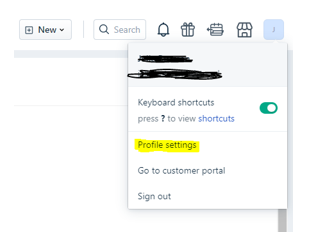
Sign in with that account and open the profile settings.
-
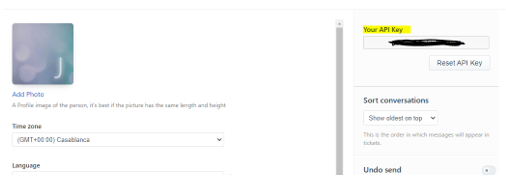
Find Your API Key and copy it.
Send the domain name and the API key to your Dstny contact or to support@dstny.se.
What this integration does not do
The integration does not save call notes or add calls to a timeline in Freshdesk.