

With VoIPcube, a call pop-up shows matching contacts from ActiveCampaign when someone calls you. Dstny connects VoIPcube to your ActiveCampaign for you.
What the pop-up shows
-
The contacts that match the caller's number. If several contacts match, you see all of them.
-
A link for each contact that opens the contact in ActiveCampaign.
-
The three most recent notes for each contact, which you can open from the pop-up.
If no contact matches the number, no pop-up appears.
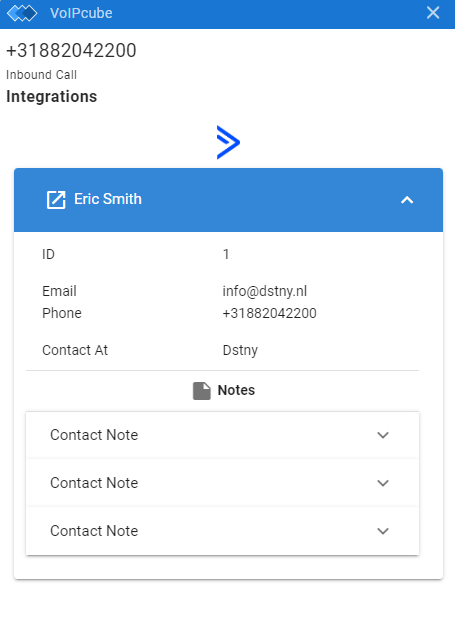
How a caller is matched
VoIPcube compares the last 9 digits of the caller's number with the phone fields on your contacts. The numbers must match exactly, so do not use spaces, dashes or other formatting in the phone fields in ActiveCampaign.
ActiveCampaign does not let VoIPcube search accounts by phone number, so only contacts are matched.
What Dstny needs from you
Dstny needs two values from your ActiveCampaign:
-
The account name.
-
An API key.
You need an administrator account in ActiveCampaign to find both.
-
Sign in to ActiveCampaign as an administrator.
-
Open Settings, then Developer.
-
Copy the account name from the URL field. It is the part between
https://and.api-us1.com. -
Copy the full value of the Key field.
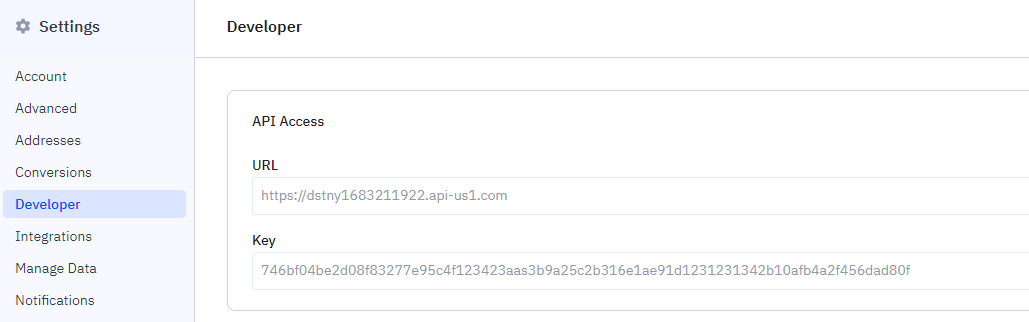
Send the two values to your Dstny contact or to support@dstny.se.
What this integration does not do
The integration does not save call notes or add calls to a timeline in ActiveCampaign.