

This guide shows how to install the Dstny app on an iPhone and sign in for the first time. Which method you can use depends on the system you connect to. If you are unsure, ask your administrator.
Activate through the configuration web page
-
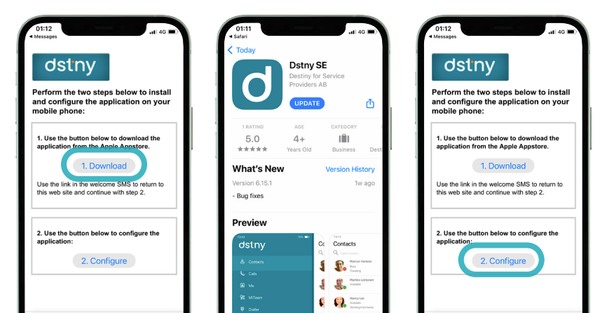
Open the welcome SMS from your administrator. It contains a link to a web page where you can download and configure the app.
-
On the web page, tap 1. Download.
-
The App Store or Google Play opens. Install the app.
-
When the installation is done, go back to the web page through the link in the SMS and tap 2. Configure.
Activate with your mobile number and a code
-
Open the link in the welcome SMS and download the app.
-
Open the app and enter your mobile number with the country code, for example +46736123456.
-
Tap Get activation code. The code arrives by SMS and email.
-
Enter the code and tap Activate.
-
When the code is accepted, the app opens and you can start calling.
Good to know
The screens you see depend on the licences and configuration your service provider has set up. If you used an earlier version of the app, version 7.0.0 keeps your settings and shows a short What's New walkthrough the first time you open it. Your company directory loads automatically on first launch, so you do not need to set up contacts before you start.
Next, read Finding your way around the app.