

Call2Teams lets your team make and receive calls from your company phone system inside Microsoft Teams. You do not have to replace your phone system. Call2Teams connects it to Teams.
You install nothing. Users only need Teams, on any device that supports it.
How it works
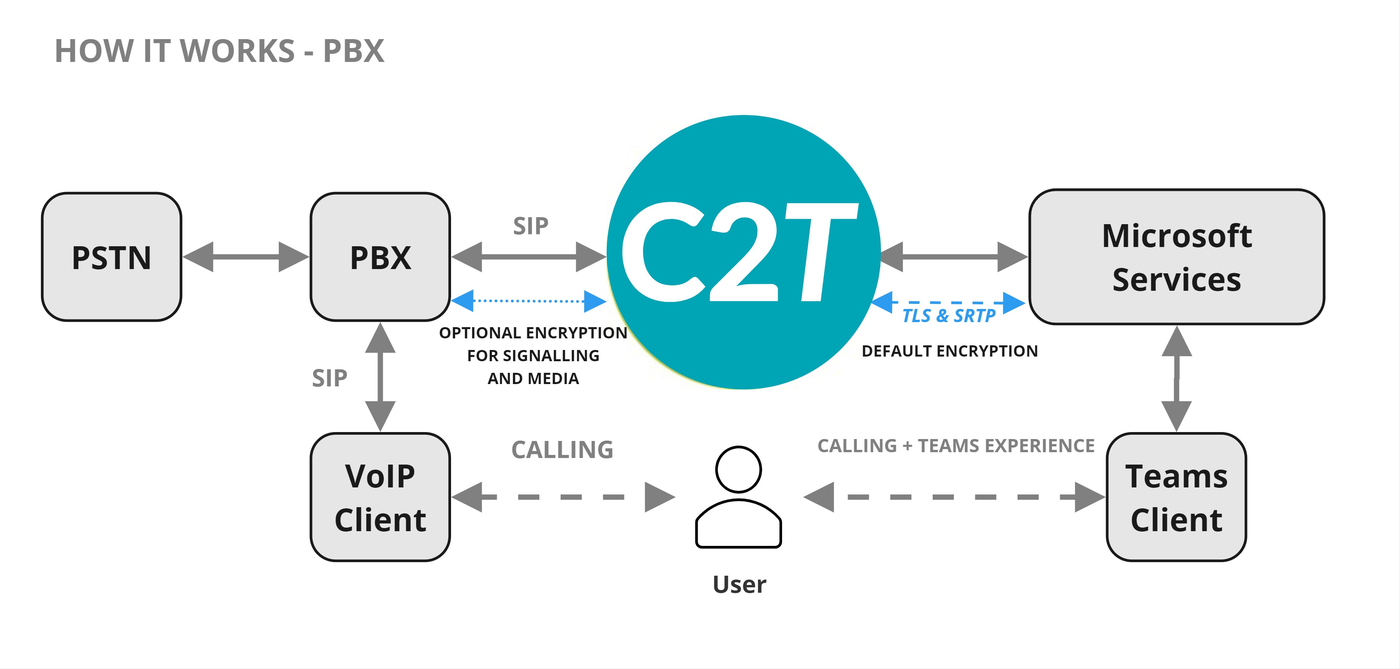
Call2Teams runs in Microsoft's cloud and connects to your Microsoft 365 tenant. Your own phone system and phone numbers carry the calls. Call2Teams is the link between them and Teams. It is not a phone system or a carrier.
There are two ways to connect, and your Dstny contact picks the one that fits you.
With a PBX
Teams users connect to your phone system in the same way as a desk phone or softphone.
What you need
-
A phone system that Dstny has connected to Call2Teams.
-
A Microsoft 365 tenant with Teams, and the right Teams calling licence for each user. See Call2Teams or Teams line status: which fits you?
-
A Microsoft administrator who can give consent and manage Teams users.
Calling is voice only. Call2Teams does not offer video calling.
Security
Calls between Call2Teams and Microsoft 365 are always encrypted. Between your phone system and Call2Teams the encryption is optional but recommended, because that part of the call crosses the public internet.
Availability and support
The goal for voice is an availability of at least 99.99 percent each month. Planned maintenance and outages caused by other companies' products are not counted. If you need help, contact Dstny support.
Next steps