

Configuring Your Own Hardware for Dstny
If you have hardware that is not supported by Dstny, you are responsible for configuring it to work with our phone system.
Dstny cannot guarantee that unsupported equipment will function correctly. We therefore recommend using supported hardware.
Preconfigured Hardware from Dstny
If you order hardware from us, it will be delivered preconfigured. All you need to do is connect the device – everything is already set up and ready to use.
What Information Do I Need?
To configure your own hardware, you will need SIP credentials. Please contact our support team, and we will help you obtain them.
Each user receives:
-
Username
-
Password
-
Domain
-
Server: bc.dstny.se or bc2.dstny.se (depending on the phone system platform)
Where Do I Enter These Details?
To configure your hardware, you need access to its web interface. Your computer must be connected to the same network as the device.
Step 1: Find the IP Address
-
Wireless phone (e.g. Gigaset N610): Press the button on the front of the base station. The IP address will appear on the phone's display.
-
Desk phone: The IP address can usually be found in the phone's settings menu.
Step 2: Log In Through Your Web Browser
-
Open your web browser and enter the device's IP address (e.g. http://192.168.1.50).
-
Log in. The default login credentials are usually:
-
Username: admin
-
Password: admin
-
-
Enter your SIP credentials in the interface.
Example – Gigaset N610
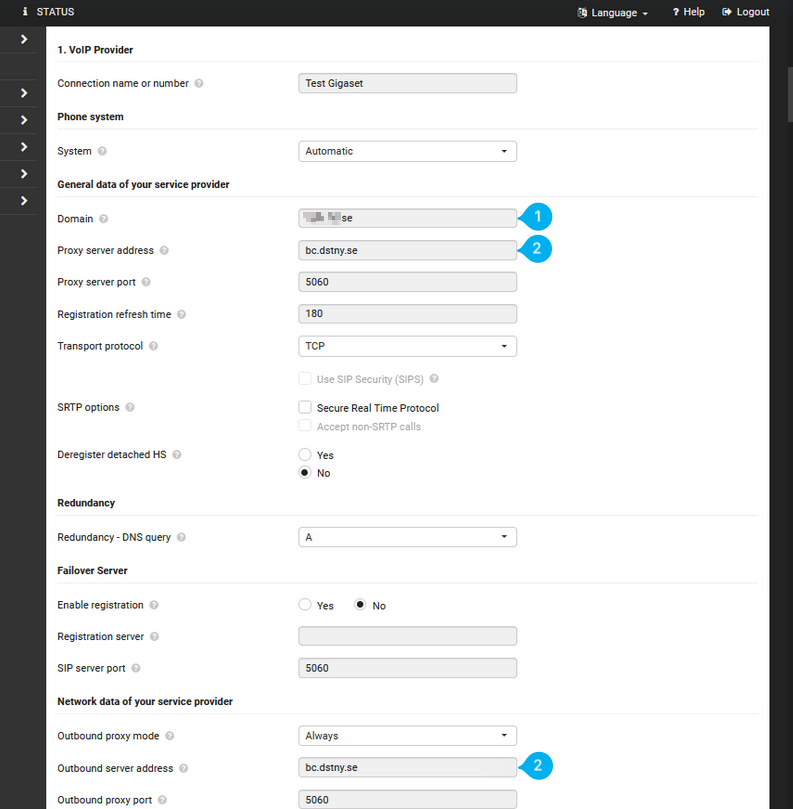
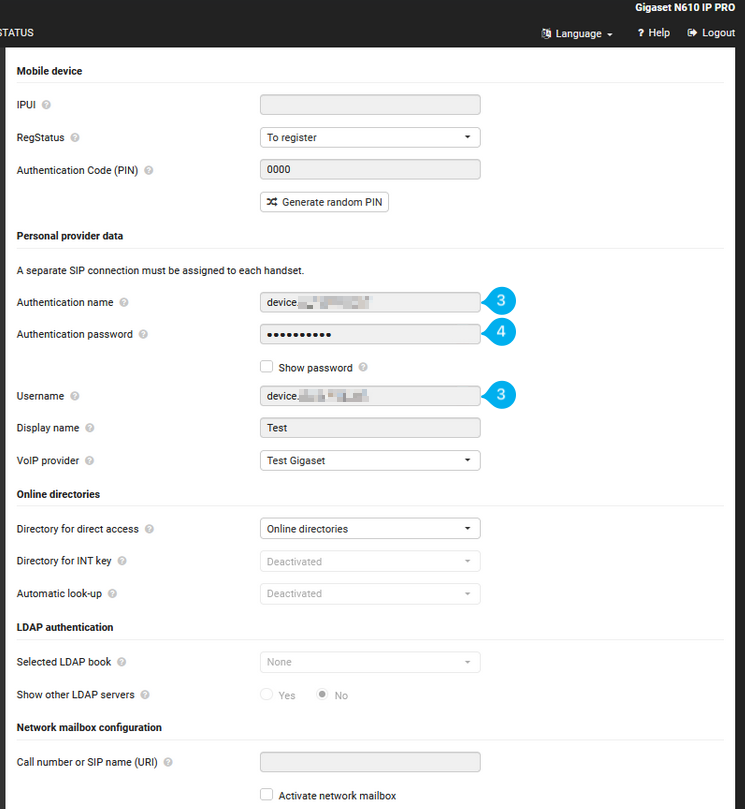
When configuring a Gigaset N610, enter the following details:
-
Domain
-
Server: bc.dstny.se or bc2.dstny.se
-
Username
-
Password
Tips
-
Check the hardware manual for more detailed instructions.
-
Contact our support team if you get stuck at any step.
Below is a list of hardware supported by Dstny
Below you will find a list of hardware that we support. Please note that this list may change over time.
Snom
-
Snom D120 EOL October 2026
-
Snom D315
-
Snom D335
-
Snom D345 EOL October 2026
-
Snom D385
-
Snom D712 EOL October 2026
-
Snom D713
-
Snom 715 / D715
-
Snom D717
-
Snom 725 / D725 EOL October 2026
-
Snom D735
-
Snom D785
-
Snom M100 (Q3–Q4 2024)
Mitel
-
Mitel 6863
-
Mitel 6865
-
Mitel 6867
-
Mitel 6869
-
Mitel 6873
-
Mitel 6905
-
Mitel 6910
-
Mitel 6920
-
Mitel 6930
-
Mitel 6940
-
Mitel 6970 Conference Phone
Gigaset
-
Gigaset R700H
-
Gigaset S700H
-
Gigaset N510
-
Gigaset N610
Mediatrix
-
Mediatrix 4102s