The Dashboard in MyDstny provides a centralized view of essential call handling information. Primarily designed for agents and supervisors, it offers real-time insights into queues, agents, and active calls — all within a single workspace.
This consolidated interface helps reduce the need to switch between multiple views, allowing to manage calls more efficiently and maintain high service levels.
Dashboard will be availabe 2025-10-22

Currently, the Dashboard includes four main widgets:
- Contacts – Quick access to your favorite or frequently used contacts.
- Group Queues – Live metrics and controls for queue activity.
- List of Agents – Real-time availability and status of team members.
- Monitored Calls – Overview of waiting, parked, and pickup calls across queues
The Dashboard is continuously evolving. New widgets and customization options will be added in future updates to enhance productivity and usability further.
Widget Description
Contact
View your Favorites or all available contacts for quick access and call handling.
Group Queues
Key available actions include:
| Login / logout from a queue |  |
| Sort the queues | 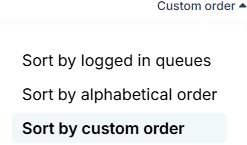 |
| Configure which queues are visible | 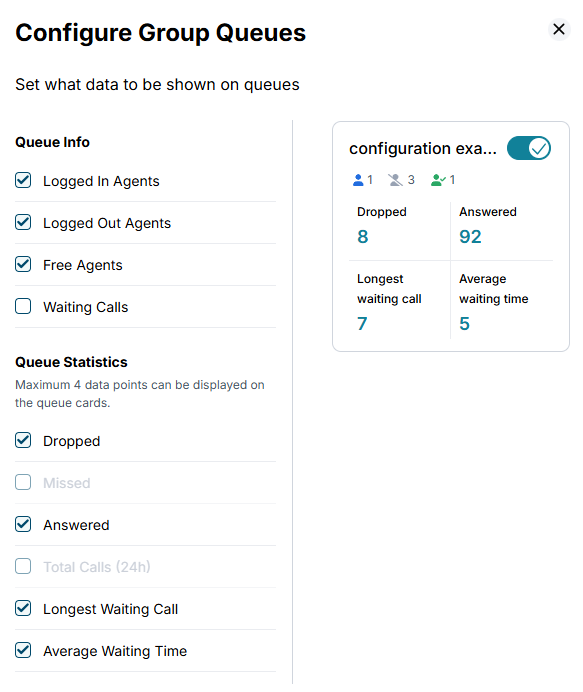 |
| Choose between a detailed or condensed view to optimize screen space |
List of Agents
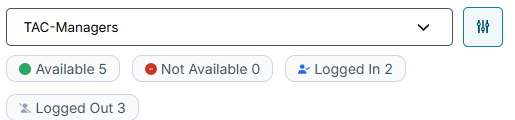
By default, all agents are displayed. You can filter the list by queue, availability, or other parameters to focus on specific team members.
Monitored Calls
Get a live view of:
- Calls waiting in queue (all or filtered by selected queue)
- Parked calls
- Pickup calls (available to be answered by others)
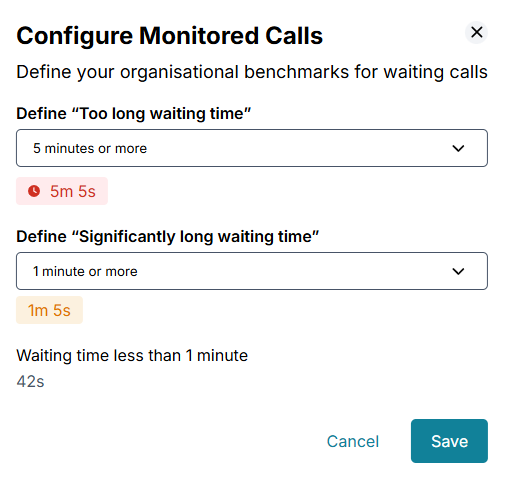
You can also configure visual alerts to monitor critical call activity better.
Updated